
Learn how to personalise your AI assistant for more effective family history research with ChatGPT’s new Customised Instructions feature.
Hey fellow family history enthusiasts! If you’re already using ChatGPT to help with your genealogical research, get ready for an upgrade. The platform has recently redesigned its Customised Instructions feature, making it more powerful and user-friendly than ever. This is a game-changer for how we interact with AI, especially when it comes to our specific needs as genealogists. Let’s dive into what’s new and how to put this feature to work for you.
What’s New with Customised Instructions?
The Customised Instructions feature isn’t entirely new, but it’s been given a major makeover. Previously, you might have tweaked your prompts each time you used ChatGPT. Now, you can set your preferences once, and they’ll be applied to every new chat. Think of it as teaching ChatGPT how you like to work so it can become a better research partner.
Today I explored a process whereby I could upload some source documentation about the new feature (ChatGPT Customised Instructions) into a Notebook using NotebookLM and then request a podcast from the AI team to discuss the benefits of the new feature for genealogists. I hope you enjoy listening!
Here are some key improvements:
Personalisation at the Account Level: You can now customise ChatGPT at the account level. This means that your instructions apply to every new chat you start, ensuring consistency.
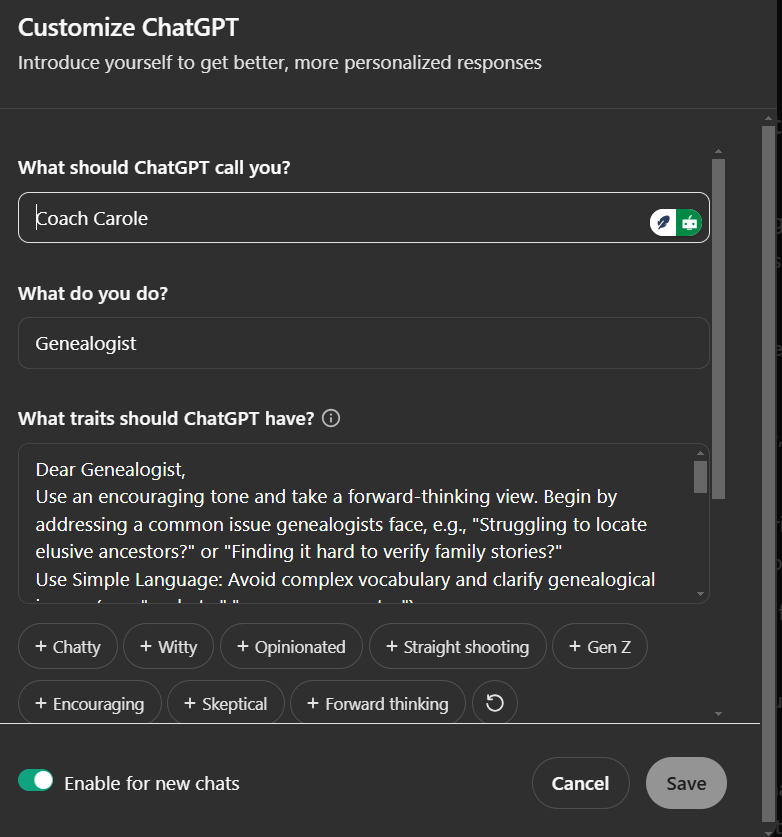
Pre-Set Options: You’re not starting from scratch! ChatGPT offers a range of pre-set options for traits, such as “Forward Thinking” and “Encouraging”. These can be added with a simple click, or you can create your own custom instructions.
More Control: You can now specify your name, profession, and preferred writing style, making the AI sound more like a familiar assistant.
How Can Genealogists Benefit?
So how can these changes help with your genealogy research? Here are some ways to put customised instructions to work:
Tailored Responses for Genealogy: You can now instruct ChatGPT to respond in a way that is specifically helpful for genealogy. For example, you can specify that it uses simple, clear language and avoids genealogical jargon, making it easier to understand. Terms like “probate” and “census enumerator” can be clarified.
A Conversational and Encouraging Tone: You can customise the AI’s tone and style. You might ask it to use an encouraging tone, take a forward-thinking view, and address common issues faced by genealogists. You can even ask it to incorporate rhetorical questions or add personal touches.
Clear, Organised Content: You can also ask ChatGPT to organise its content clearly, using concise paragraphs and genealogy-specific subheadings. For example, you might request “Brick Wall Strategies” or “Analysing DNA Matches” as subheadings.
Actionable Steps and Solutions: You can also ensure the AI provides actionable steps and solutions, such as “Explore alternate spellings of surnames” or “Utilise historical maps.” You can also ask for numbered steps such as “1. Start with oral histories; 2. Organise records chronologically; 3. Cross-reference with local archives”.
Consistency Across Chats: Once you set these preferences, you can be assured of consistent, relevant responses in all your new chats.
Setting Up Your Customised Instructions
To get started, simply go to your profile picture in ChatGPT and select “Customise GPT”. From there, you can enter your preferred name, profession, and instructions for the AI. Don’t forget to enable the new chat option to make sure your custom instructions are always applied.
Customisation is Key
This feature is all about personalising your AI experience. It allows you to set the stage for how ChatGPT interacts with you in every new chat so that it becomes a real research partner in your genealogy work. Experiment with different settings to find what works best for you. Remember, your custom instructions can be updated and refined over time as your needs change.
PS NotebookLM also helped me with the layout, content, and SEO titles for this blog post!
I need to give a shout-out to Raj at Skill Leap AI for his instructional videos on this topic!
If you are looking to improve your AI Skills in Genealogy in 2025, come and enrol in a course at the Esssential Genealogy 2.0 Academy.
This new course began this week and is still open for enrolment!