| Here’s What That Means for Family Historians |
If you’ve ever finished a research session with six browser tabs open, a half-filled spreadsheet, a notes app and a chat window all competing for your attention, this month’s Claude updates are for you.
Over the past few weeks, Anthropic has released a wave of changes to Claude: new models, new built-in tools, and apps that now open right beside your chat. It’s a lot to sort through. Paul J Lipsky’s walkthrough, Claude Is So Different Now (Every Update That Matters), distils it down to seven updates worth knowing. I’ve used his list as the backbone of this post.
My aim is a little different from Paul’s. For each update, I want to answer the question my learners keep asking: what does this actually do for my family history research? And because many of you are on the Pro plan, I’ll be clear about what’s included and what isn’t.
The big shift: from chat window to workspace
Paul’s central point is worth repeating. Claude is no longer just a place to ask questions. It’s becoming a workspace where you can plan, organise, build and write without constantly hopping between apps.
For genealogists, that matters. Our work has always been about keeping evidence, analysis and narrative connected. Every time we copy and paste between tools, there’s another chance for a date to slip or a source citation to go missing.
1. The models: Opus 5.5 is still your everyday workhorse.
Anthropic released Claude Fable 5.2 this month — its most powerful model yet. Yet Paul’s verdict is refreshingly practical: he uses Opus 5.5 about 95% of the time. It balances intelligence, speed and cost, and he rarely hits his limits. He switches to Fable only for design work and genuinely high-stakes tasks.
On the Pro plan, this distinction matters. Fable models aren’t included in Pro’s usage limits; they run on paid usage credits. The free launch-week window for Pro ended on 16 November. (Although I did have a lot of creative Fun with Fable while that lasted.) Max and Ultra plans include Fable within their limits.
For your research: start every task in Opus 5.5 — checking a transcription, analysing a census household, drafting an ancestor profile. Sonnet 5.5 and Haiku 5.5 sit in the model picker for lighter, quicker jobs. Save Fable (and your credits) for something substantial, such as weaving a major narrative chapter or reconciling a tangle of conflicting evidence.
Tip: My rule of thumb: if you find yourself reaching for Fable, first ask whether a clearer prompt would get you there.
2. Whiteboards: see your research, not just read it
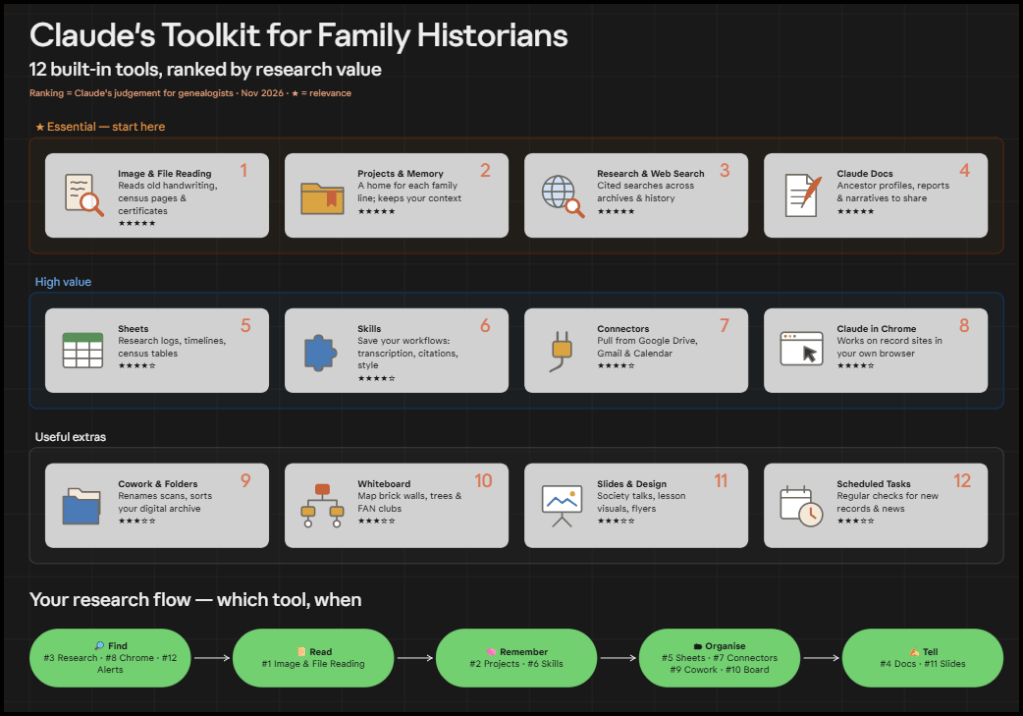
My first whiteboard created with this prompt:
Create a whiteboard grid of special tools now inside Claude and rank them by relevance and importance for family historians, a visually rich board, with fewer words and more icons and diagrams.
Claude Whiteboards gives you a visual board inside Claude. You and Claude can lay out ideas as blocks and arrows, move them around, and add sticky notes. When you’re done, ask Claude to turn the board into a document or presentation. Whiteboards are in beta on all paid plans, including Pro, across web, desktop and mobile.
Paul’s tip is a good one: ask for a visually rich board, with fewer words and more icons and diagrams. Otherwise it tends towards text.
For your research: this is made for brick walls. Lay out what you know, the records that conflict, your working hypotheses, and the record sets still to search — GRO indexes, the 1911 census, workhouse admission registers. Seeing the gaps side by side often shows you where to look next.
Try this prompt:
Use a whiteboard to map everything we know about [ancestor’s name], grouping the evidence by record type. Flag any conflicts between sources and list the record sets I haven’t searched yet. Make it visually rich, with fewer words and more icons.
3. Sheets: spreadsheets that live inside Claude
Until now, asking Claude for a spreadsheet meant downloading a CSV or Excel file and juggling it in another app. Claude Sheets puts a working spreadsheet right beside your chat, with tabs, formulas, formatting and drop-downs. It’s in beta on Pro and all other paid plans.
The clever part: right-click any cell and choose Ask Claude. Claude knows exactly which cell you mean, so there’s no more “the third row down, second column along”. Everything you create is saved under Artefacts in the left-hand menu.
For your research: build a census tracker for one ancestor or one household. Then click on an awkward cell and ask Claude to check it. Remember that adult ages in the 1841 census were usually rounded down to the nearest five — a detail worth building into your checks.
Try this prompt:
Create a sheet tracking [ancestor’s name] across every census from 1841 to 1921, with columns for year, address, age, occupation, relationship to head, household members and source citation. Add a column that flags any age that doesn’t fit the expected birth year.
4. Interactive connectors: your apps open beside the chat
Claude has been able to connect to apps for a while, pulling information in or acting behind the scenes. Interactive connectors go further: some apps now open as fully working windows right beside your chat. Paul demonstrates this with Notion. The page looks and behaves exactly as it does in Notion itself, and Claude can see which page you have open. No more explaining, “I’m working on the page called…”
Not every connector works this way yet, so check which of your apps are supported.
For your research: keep your research notebook open beside the chat while Claude helps you summarise a will or probate record straight into it. Your evidence and your notes stay in one view.
5. Things that have moved (nothing has gone)
Some familiar features have simply been renamed or rearranged:
- Dashboards are now Claude Data. Ask for a dashboard in any chat, and you’ll get visual charts and graphs from your numbers. It’s now generally available.
- Connectors and skills now live under Plugins in the left-hand menu.
- The mobile app is being redesigned, with tabs along the bottom for Chat, Projects, Code and Artifacts. It’s rolling out gradually, so don’t be surprised when things shift.
For your research: if you run a one-name or one-place study, Claude Data can turn a spreadsheet of baptisms into a chart of births by parish and decade. Patterns of migration often jump out in a way they never do in rows of figures.
6. Claude Design is now built in — and there’s a deadline
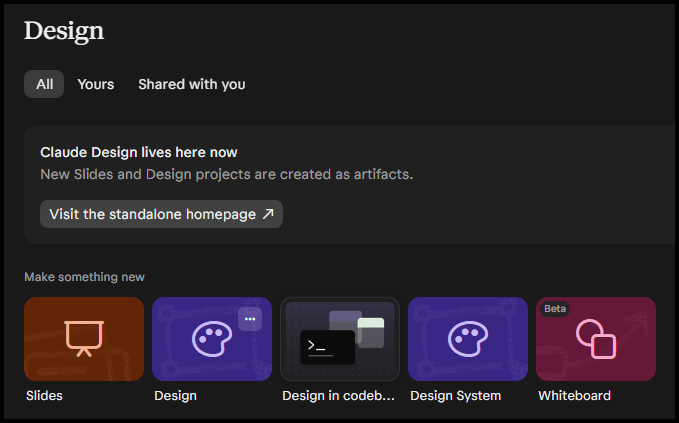
Claude Design — for slide decks, motion graphics, websites and other visual work — has moved inside the main Claude app. You’ll find it under Design in the left-hand menu, or simply ask for slides in any chat.
Important: the standalone site at claude.ai/design closes on 14 December 2026. After that date, it becomes read-only, and you can’t start new projects there. Your chats and comments from the standalone site don’t carry across. If you’ve built anything there you want to keep, move it now.
Design also lets you set up a design system — think of it as a brand kit of colours, fonts and style that Claude applies to everything it designs for you. (I really like this one as I am a frequent builder of slide decks and want to keep them on brand.)
For your research: build slides for your next family history society talk, a one-page ancestor profile for a family reunion, or handouts that all share the same look.
7. Duet and the New Projects
Claude Duet is Anthropic’s proactive, always-on agent, powered by Opus 5.5. It runs in the background, monitors your connected tools and aims to handle tasks on its own. It’s in research preview and, according to Paul, rolling out to more users on the Pro, Max and Ultra plans. Paul is honest that he tried it and didn’t take to it — he found it didn’t sit well alongside his existing chats and projects. It’s promising, but early.
What Paul does love is the redesigned ‘Projects‘, and I can see why. A new project holds persistent context — files, or a whole folder — and its main chat acts as a coordinator. Brief it like you would a research assistant, and it opens a separate thread for each task, checks in on them, and reports back in one place.
The new ‘Projects’ are rolling out in stages to Pro and Max subscribers, with a waitlist if you don’t have access yet. Your existing projects keep working as they are. One thing to watch: several threads running at once use your plan’s limits faster.
For your research: imagine one project per family line, with your folder of transcriptions attached. Ask the coordinator to analyse the 1881 census household in one thread, build a timeline from the baptism and marriage entries in another, and draft a research plan for the missing death in a third.
Try this prompt (in a new project):
Open a thread to analyse the 1881 census household for [ancestor’s name], and another to build a timeline from the baptism and marriage entries in my transcriptions folder. Report back here when both are done.
Your Pro plan at a glance
| Feature | On the Pro plan? | Notes |
|---|---|---|
| Opus 5.5, Sonnet 5.5, Haiku 5.5 | Yes | Within your plan’s usage limits |
| Fable 5.2 | Usage credits | Included in Max and Ultra plans |
| Whiteboards | Yes (beta) | Web, desktop and mobile |
| Sheets | Yes (beta) | Saved under Artefacts |
| Claude Data | Yes | Formerly Claude Dashboards |
| Claude Design | Yes | The standalone site closes on 14 December 2026 |
| New Projects | Rolling out | Waitlist available |
| Duet | Rolling out | Research preview |
A word of caution
New tools, same standards. A whiteboard makes a brick wall easier to see, and a sheet makes a census run easier to check — but neither replaces going back to the original record. Verify every name, date and citation against its source before it goes into your tree or your narrative.
These features are also changing quickly. Several are in beta or still rolling out, so what you see in your account may differ slightly from what’s described here.
Over to you
What strikes me most about this month’s updates isn’t any single feature. It’s the shift from asking AI a question to working alongside AI in one place — evidence, analysis and story kept together, the way good genealogy has always worked.
Which of these updates would change your research week the most — Whiteboards, Sheets or the new Projects? Tell me in the comments. I’d love to hear how you put them to work.
If you’d like to build confident, repeatable AI workflows for your own family history, join me at the Essential Genealogy Academy.
Last checked: 26 November 2026
Sources
- Paul J Lipsky, Claude Is So Different Now (Every Update That Matters), YouTube, 25 November 2026
- Claude Help Centre, Claude Fable models on your plan
- Claude Help Centre, Claude Sheets
- Claude Help Centre, Move from standalone Claude Design to Claude
- Claude blog, Projects redesigned: from folder to conversation
Genealogy Assistant Claude @ Anthropic


Leave a Reply